Why ten minutes is the right budget
Research has diminishing returns. The first few minutes tell you whether the account fits and whether anything has changed recently. The next few tell you who to contact and what to say. After that, most of what you find is interesting but does not change the message. A fixed budget forces you to look for the facts that matter and stop.
Ten minutes also makes the work predictable. For example, a rep who researches six accounts a morning at ten minutes each spends an hour on research and still has the rest of the day for writing, calls and follow-ups. A rep who spends forty minutes per account researches the same six accounts by lunch and has little time left to contact them.
The budget is for a first message. Before a discovery call or a demo, an account executive will go deeper. The routine below is the floor, not the ceiling.
Decide what you need to know before you start
Good prospect research answers three questions. Write them at the top of your notes so you do not drift.
- Does this account fit? Check it against your ideal customer profile: industry, size, situation and disqualifiers.
- Why now? Look for a recent change, such as a hire, a funding round, a new leader or a new location, that makes your message timely.
- Who and what angle? Find the person most likely to own the problem and the one idea most likely to interest them.
If the answer to the first question is no, stop. You have saved the remaining minutes for an account that deserves them.
The 10-minute prospect research routine
Use a timer for the first few weeks. It feels rigid at first and becomes habit quickly.
0 to 1
- What to check
- Homepage and product pages
- What to write down
- What they sell, to whom, and how they describe themselves
1 to 3
- What to check
- Careers and jobs pages
- What to write down
- Roles they are hiring for, team sizes implied, tools listed
3 to 5
- What to check
- News, press and blog
- What to write down
- Anything dated in the last few months that changes their situation
5 to 7
- What to check
- Leadership page and your contact's public profile
- What to write down
- Who owns the problem, how long they have been in the role, what they post about
7 to 8
- What to check
- Tools and integrations
- What to write down
- Technology near yours, signs of a switch
8 to 10
- What to check
- Your notes
- What to write down
- A three-line brief and the opening line of the message
Minute 0 to 1 read the homepage like a buyer
Skim the headline, the main navigation and one product page. Write down in your own words what they sell and to whom. Note the language they use about themselves, because echoing it later makes your message easier to read. If the homepage already shows a disqualifier, such as a business model you do not serve, stop here.
Minutes 1 to 3 read the careers page
The careers page is the most underrated source in prospect research. It tells you which teams are growing, what problems new hires are meant to solve and often which tools the company uses. For example, a posting for a "first marketing operations manager" says the company has outgrown ad hoc marketing and is about to build process, which matters if you sell anything marketing operations touches.
Minutes 3 to 5 check news, press and blog
Look for dated changes in the last few months: funding, launches, new offices, partnerships, leadership announcements. One relevant event is enough. If you find nothing recent, note that too; the account may belong on a watch list rather than in today's outreach. Our guide to sales trigger events explains which events are worth acting on.
Minutes 5 to 7 find the right person and read their public profile
Use the leadership page and professional profiles to find who owns the problem you solve. Check how long they have been in the role and skim their last few public posts. You are looking for one thing they care about, in their words. Do not read years of history. Two minutes is enough to avoid an obvious mismatch and find a hook.
Minutes 7 to 8 note tools and integrations
Job postings, integration pages and public case material often show which tools the company uses. Note anything close to your product, especially signs of a replacement or a gap. This line becomes useful context for the second or third message even if it does not appear in the first.
Minutes 8 to 10 write the brief and the first line
Close the tabs and write. The brief is three lines: fit, why now, angle. Then write the first sentence of your message from the why now line. If you cannot write that sentence, the research is not done, and the honest choice is to move the account to a watch list.
Turn your notes into a three-line research brief
A short brief is easier to reuse than a page of notes, and a manager can scan it in seconds.
- Fit, for example: B2B software, about 200 employees, sells to mid-market finance teams, matches our profile.
- Why now, for example: Hiring a head of revenue operations and two sales operations analysts, postings mention a CRM migration.
- Angle, for example: New RevOps leader inherits a migration; offer a checklist for cleaning account data before the move.
From that brief, the opening line almost writes itself, for example: "Saw you are hiring a head of RevOps while the team moves to a new CRM, which is usually when duplicate accounts become someone's full-time problem." The rest of the message offers the checklist and asks one light question.
Where to find each fact when you research a prospect
What do they sell and to whom
- Best first source
- Homepage and product pages
- Backup source
- Recent case material on their site
How big are they
- Best first source
- Professional network company page
- Backup source
- Careers page and team page
Are they growing
- Best first source
- Number and type of open roles
- Backup source
- Recent office or funding announcements
What changed recently
- Best first source
- Press page and company blog
- Backup source
- Public filings and news coverage
Who owns the problem
- Best first source
- Leadership page
- Backup source
- Job postings that name the hiring manager
What does that person care about
- Best first source
- Their recent public posts
- Backup source
- Interviews, podcasts and talks
Which tools do they use
- Best first source
- Job postings
- Backup source
- Integration and partner pages
Research the person without crossing the line
The goal is relevance, not surveillance. Stick to professional, public information: their role, their tenure, what they post about their work and what their company announces. Leave personal details out of your message entirely. Mentioning someone's family, location history or private interests makes a cold email feel intrusive and rarely helps.
A good test is to imagine the reader asking "how did you know that?" If the honest answer is "it is on your company's careers page" or "you wrote about it last week", you are fine. If the answer requires an explanation, leave it out.
How deep to go depends on the role and the stage
- SDRs writing first messages can stay inside the ten minutes for almost every account.
- Founders doing their own outbound should use the same routine and resist turning every account into an hour of reading.
- Account executives preparing for a first call usually add a second pass: reading the account's recent public statements in full and mapping the buying group.
- For a top-priority named account, a longer research session is worth it, but write the three-line brief first so you know what you are trying to learn.
Time traps that turn ten minutes into forty
- Reading the entire blog archive instead of the last few months.
- Going down a rabbit hole on the founder's background when the buyer is someone else.
- Researching an account before checking fit, then discovering a disqualifier at minute twenty.
- Collecting facts you will never use in a message.
- Switching between too many tools and tabs. Fix the order of sources and keep it.
- Rewriting the first line again and again. Send a good message today rather than a perfect one next week.
Do the ten-minute research on every account at once
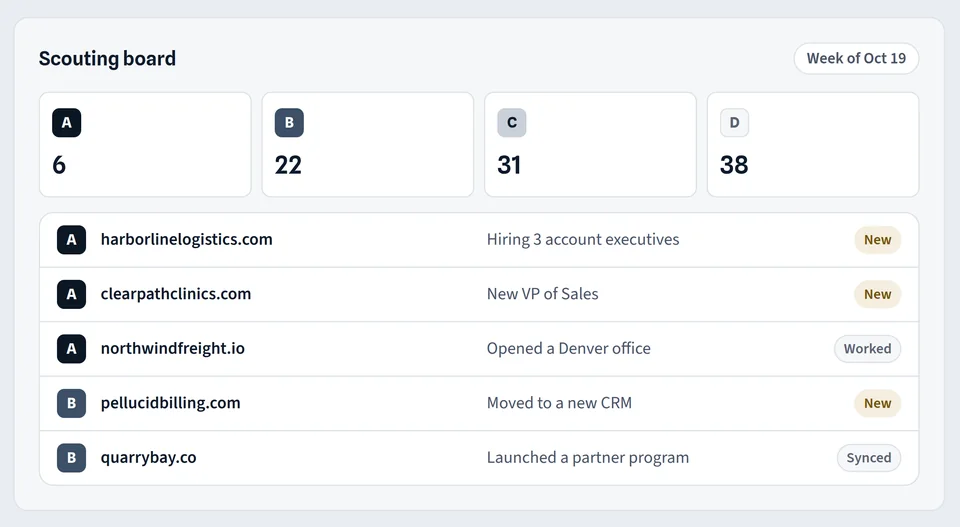
The routine above is what ProspectScouter does for each account on your scouting board. It reads the homepage, careers and jobs pages, about pages, news and blog posts, and public filings and announcements, then produces a scouting report with a fit grade from A to D and the reasons, the buying signals with a link to each source and a quoted snippet, a company snapshot, the roles to contact and a suggested angle. The prospect research page shows what a report contains.
The report also includes a first email and a LinkedIn note written from the signal in your tone. When you are ready to contact someone, the contact finder adds verified work emails and direct lines for the roles in the report; see the LinkedIn email finder and data enrichment pages for how contacts are found and checked before export. Your rep still reads the report and decides, which keeps the judgment where it belongs.