What an ideal customer profile is and what it is not
An ideal customer profile (ICP) describes a company, not a person. It lists the traits of the accounts where your product solves a painful problem, the deal closes at a reasonable cost and the customer renews. A buyer persona sits one level below it and describes the people inside that company: their role, their goals and the objections they raise. You need both, but the ICP comes first, because a perfect persona at the wrong company still produces a lost deal.
A useful ICP is narrow enough to say no. If every B2B company with more than ten employees qualifies, the profile does not help a rep decide what to do on Monday morning. The test is simple: hand the profile to a new SDR along with a list of fifty companies and ask them to sort it. If two reps sort the same list differently, the profile is still too vague.
It is also not a wish list. Teams often write the ICP around the logos they would like to have rather than the accounts that actually bought. Aspiration belongs in your strategy deck. The profile your reps use every day should describe reality, then you widen it on purpose when you have evidence that a new segment converts.
Build your ideal customer profile from the customers you already win
The fastest route to an honest profile is your own closed-won list. Pull the accounts you signed in the last twelve to eighteen months and mark the ones you would happily clone. Good markers are a short sales cycle, renewal or expansion, low support load and a champion who still answers your emails.
Then look for what those accounts share. You are looking for patterns, not averages. For example, if most of your best accounts are software companies between 50 and 300 employees that had just hired their first RevOps person when they bought, that hiring moment is part of your ICP, not a coincidence.
Do the same exercise in reverse with churned and stalled deals. The traits that show up again and again in deals you lost or customers who left become your disqualifiers. Many teams skip this step, and it is the one that saves reps the most time.
Questions to ask about each won account
- What problem were they trying to solve when they first talked to us, in their words.
- What changed at the company in the months before they bought (a hire, a funding round, a new market, a new tool).
- Who signed, who championed the deal and who could have blocked it.
- Which tools were they already using, and which did we replace or connect to.
- How long did the deal take from first reply to signature, and what slowed it down.
- Did they expand, renew or leave, and why.
The ideal customer profile template
Copy the table below into a shared document and fill in the middle column. Keep each answer to one or two lines. The right column shows the kind of entry that works; it describes an invented company that sells onboarding software, so replace every line with your own facts.
Industry or vertical
- What to write
- The two or three industries where you win most often
- For example
- B2B software, IT services, fintech
Company size
- What to write
- Employee range where deals close and stick
- For example
- 50 to 500 employees
Geography
- What to write
- Countries or regions you can sell to and support
- For example
- United States and Canada
Business model
- What to write
- How they make money, if it matters to your product
- For example
- Subscription revenue, sells to other businesses
Growth stage
- What to write
- Funding stage or growth pattern
- For example
- Series A to Series C, or profitable and hiring
Team that feels the pain
- What to write
- Department whose problem you solve
- For example
- Customer success team of five or more
Economic buyer
- What to write
- Role that signs
- For example
- VP Customer Success or COO
Champion
- What to write
- Role that pushes the deal internally
- For example
- Head of Onboarding or CS Operations Manager
Technology in place
- What to write
- Tools that signal fit or that you integrate with
- For example
- Uses a CRM and a help desk, no onboarding tool yet
Problem in their words
- What to write
- The phrase a buyer uses to describe the pain
- For example
- New customers take too long to go live
Trigger events
- What to write
- Changes that make now a good time
- For example
- Hiring CSMs, new funding, new VP of CS
Disqualifiers
- What to write
- Traits that make a deal unlikely or unprofitable
- For example
- Under 20 employees, fully self-serve product, in-house tool
Typical deal
- What to write
- Rough contract size and length you aim for
- For example
- Annual plan, mid five figures
Proof you can show
- What to write
- Case material or experience that matches this profile
- For example
- Onboarding playbook for SaaS teams
Firmographics
The first five rows are firmographics: industry, size, location, business model and stage. They are the easiest to fill and the easiest to filter on, which is why most lists stop there. On their own they describe thousands of companies that look the same on paper.
Situation and triggers
The middle rows describe the situation inside the account: who feels the problem, who buys, what tools are in place and what has just changed. This is where an ICP starts to separate an account that looks right from an account that is ready. Our guides to buying signals and sales trigger events go deeper on what to put in the trigger row.
Disqualifiers
The disqualifier row is the most valuable line in the template. Write it with the same care as the positive traits. A rep who can rule out an account in ten seconds has more time for the accounts that deserve a careful first message.
How to fill each row without guessing
Every row should be backed by something you can point to: a deal record, a call recording, a churn note or a conversation with a customer. When a row is a guess, mark it as a hypothesis and set a date to check it.
- Use your CRM for size, industry, geography and deal length. Export closed-won and closed-lost deals and compare the two groups side by side.
- Use call notes and recordings for the problem row. Copy the buyer's exact phrases. They become subject lines and openers later.
- Use your customer success team for the disqualifiers. They know which accounts were painful to onboard and why.
- Use public company pages for triggers. Careers pages, press releases and leadership pages show what changed before a deal started.
- Keep the economic buyer and the champion separate. In many deals they are different people with different reasons to care.
For example, a team that sells payroll software may find that its best deals came from companies that had just opened an office in a second state. That fact rarely shows up in a firmographic filter, but it is visible on a careers page that lists jobs in two locations, and it belongs in the trigger row.
Turn the profile into a fit grade
A profile becomes useful in daily work when it turns into a grade. Instead of debating every account, reps check it against the profile and assign a letter. A four-level scale keeps the decision quick and still leaves room for nuance.
A
- Rule of thumb
- Matches the core firmographics and shows at least one trigger from the profile
- What the rep does
- Research today, personal first message this week
B
- Rule of thumb
- Matches the firmographics, no current trigger
- What the rep does
- Add to a watch list, contact when a signal appears
C
- Rule of thumb
- Partial match on firmographics, no disqualifier
- What the rep does
- Light-touch sequence or leave for later
D
- Rule of thumb
- Hits a disqualifier
- What the rep does
- Do not contact, remove from the list
The important part is that each grade comes with reasons. An A grade that says "software company, 180 employees, hiring two CSMs this month" is something a rep can act on and a manager can check. A score of 87 out of 100 with no explanation is not. If you want to see how this works on a live account, the account scoring page shows how ProspectScouter grades accounts A to D and lists the reasons behind each grade.
Common ideal customer profile mistakes
- Writing the profile around company size only. Size tells you about budget, not about need or timing.
- Copying a competitor's positioning. Their best customers are not automatically yours.
- Skipping disqualifiers. Without them the list grows every week and reps chase accounts that never close.
- Mixing several profiles into one. If you sell to two different segments, write two profiles and keep them apart.
- Leaving the profile in a slide deck. If it is not in the CRM and in the tools your reps use, it is not being used.
- Never updating it. Markets move and products change; a profile written two years ago describes a different company.
Keep the profile alive with a quarterly review
Set a recurring review once a quarter. Pull the deals won and lost since the last review and check them against each row. Did the size range hold? Did a new trigger show up in several wins? Did a disqualifier turn out to be wrong? Change the template, write down what changed and tell the team.
It also helps to track how the grades perform. If A accounts reply and convert noticeably better than B accounts, the profile is doing its job. If the grades make no difference to outcomes, the profile is describing the wrong things, usually firmographics without triggers.
When you add a new segment, add a new profile rather than widening the old one. A separate profile keeps reporting clean and lets you see whether the new segment is worth the effort.
Use your ideal customer profile in ProspectScouter
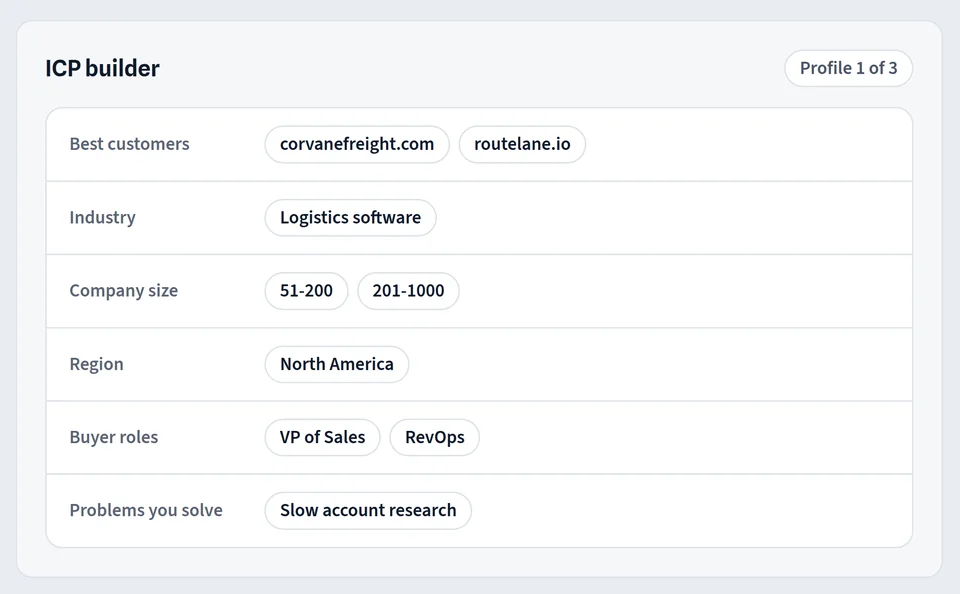
ProspectScouter starts from the same idea. The ICP builder reads your website and the best customers you name, then drafts a profile with industries, size, roles and trigger events that you can edit. From that profile it builds a weekly scouting board: a ranked list of accounts that match, each graded A to D with reasons.
Each account on the board has a scouting report with the buying signals found on public pages, a link to every source with a quoted snippet, the roles to contact and a first email written from the signal. The prospect research page describes what goes into a report, and the how it works page shows the full path from profile to first message. Starter includes one ICP; Growth includes three and Scale ten, so teams that sell to more than one segment can keep their profiles separate, as described on the pricing page.